SEO Basics – Part 3
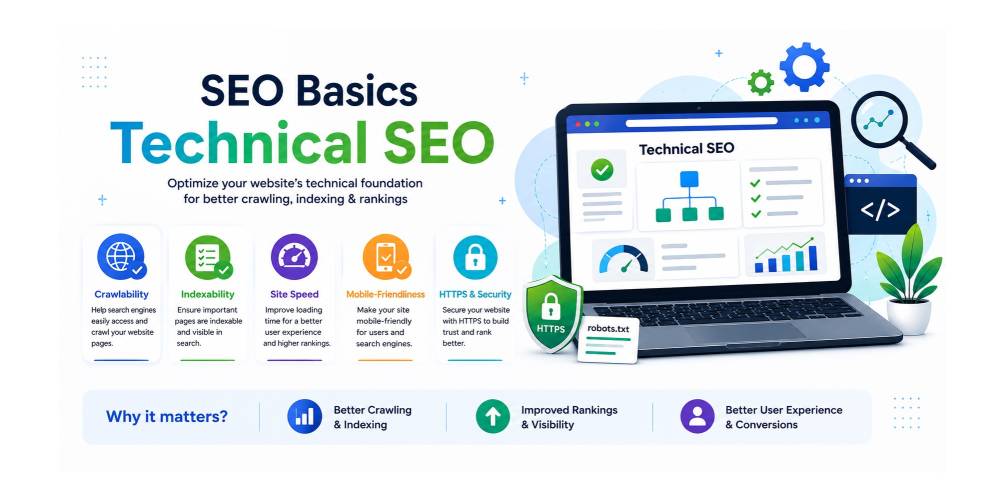
Technical SEO
What is Technical SEO?
Technical SEO refers to the optimization of a website’s technical aspects to help search engines crawl, index and understand the website more effectively. Unlike content SEO, which focuses on text and keywords, technical SEO ensures that the website’s structure, speed, security and overall architecture meet search engine standards.
Key components of Technical SEO include:
- Website speed optimization: Ensuring pages load quickly to improve user experience and rankings.
- Mobile-friendliness: Making sure the site works well on mobile devices.
- Secure connection (HTTPS): Using SSL certificates to secure the website.
- Structured data / schema markup: Helping search engines understand content types like products, reviews or articles.
- Crawlability and indexing: Making sure search engines can access all important pages.
What is a sitemap?
A sitemap is a file that lists all the pages of a website in a structured format, helping search engines discover and index content efficiently. Sitemaps act like a roadmap for search engines, showing them which pages are important, how often they are updated and when they were last modified.
Benefits of a sitemap:
- Ensures new or updated pages are quickly discovered by search engines.
- Helps pages with fewer internal links get indexed.
- Can improve visibility of large websites or complex sites.
What is robots.txt / What is a robots.txt file and how do you use it?
A robots.txt file is a plain text file placed in the root directory of a website that tells search engine crawlers (robots) which pages or directories they can or cannot access.
Example use cases:
- Preventing search engines from indexing duplicate content pages.
- Blocking admin pages, login pages or sensitive sections.
Important: Robots.txt does not guarantee pages won’t appear in search results; it only guides crawlers.
What is an XML sitemap vs HTML sitemap?
- XML Sitemap:
- Designed for search engines.
- Contains structured data in XML format listing all URLs and additional metadata (like last modified date, priority).
- Example: https://technogaze.com/sitemap.xml
- Helps search engines crawl and index efficiently, especially for large websites.
- HTML Sitemap:
- Designed for human users.
- Provides a page that lists important links to help visitors navigate the website.
- Example: https://technogaze.com/sitemap.html
- Improves user experience and internal linking.
In short, XML sitemaps are for search engines, HTML sitemaps are for users.
What is crawling & indexing?
- Crawling:
- The process by which search engine bots (like Googlebot) scan the web to discover new or updated pages.
- Search engines follow links from known pages to find new content.
- Indexing:
- After crawling, the discovered pages are analyzed and stored in the search engine’s database (index).
- Indexed pages can appear in search results when users search relevant queries.
Analogy:
Think of crawling as “reading the content of your website,” and indexing as “storing it in a library catalog so it can be found later.”
What are possible reasons for pages not getting indexed?
There are several reasons why a webpage might not appear in search engine results:
Noindex tag: If a page has a noindex meta tag, search engines are explicitly told not to index it.
Robots.txt blocking: The page might be disallowed in robots.txt.
Low-quality or thin content: Pages with very little content or duplicate content may be skipped.
Duplicate content: If search engines find a similar page already indexed, they may ignore the duplicate.
Crawl errors: Server errors, broken links or inaccessible pages can prevent indexing.
Poor internal linking: Pages that are not linked well internally may not be discovered or considered important.
Slow loading: Pages with very slow loading times can be crawled less frequently.
Recent publication: Newly published pages may take time to be indexed.
Why are my pages discovered but not indexed?
This usually means search engines found your page but chose not to index it. Common causes:
- Low-quality or thin content: Search engines may decide the content doesn’t add value.
- Duplicate content: Canonical tags may indicate another page as preferred.
- Noindex or conflicting tags: Sometimes the page has conflicting signals like noindex in meta tags.
- Crawl budget limitations: If your site is large, search engines may prioritize other pages.
- Slow or inaccessible pages: Pages that fail to load or have technical errors may not get indexed.
Tip: Use Google Search Console to check the Index Coverage report for detailed insights.
What is crawl budget?
Crawl budget is the number of pages a search engine bot will crawl on your website within a given time.
- Large websites with thousands of pages may not get all pages crawled if the crawl budget is low.
- Factors affecting crawl budget:
- Site speed: Faster sites allow more pages to be crawled.
- Server stability: Frequent errors reduce crawl budget.
- Internal linking structure: Well-linked pages get prioritized.
- Page importance: Pages with more traffic or authority are crawled more often.
Why it matters: Efficient use of crawl budget ensures that important pages get discovered and indexed quickly.
What is canonical tag / canonical issue?
A canonical tag is an HTML element (<link rel="canonical" href="URL" />) that tells search engines which version of a page is the “preferred” one to index.
Why it’s used:
- To avoid duplicate content issues.
- To consolidate ranking signals (links, authority) to a single URL.
Example:
If example.com/page and example.com/page?ref=123 are the same, the canonical tag on the second page can point to example.com/page.
Canonical issues happen when:
- Multiple pages point to each other in a loop.
- Canonical points to a wrong or non-existent URL.
- No canonical is set on duplicate pages.
What is page speed and why does it matter?
Page speed is the time it takes for a webpage to fully load in a browser.
Why it matters:
- SEO ranking factor: Google uses Core Web Vitals (loading speed, interactivity, visual stability) as ranking signals.
- User experience: Slow pages increase bounce rates and reduce engagement.
- Conversion rate: Faster pages lead to better sales, sign-ups or interactions.
Tools to check speed: Google PageSpeed Insights, GTmetrix, Lighthouse.
Tip: Optimizing images, using caching, minimizing CSS/JS and improving server response time can significantly improve page speed.
What is mobile-first indexing / Google’s preferred method of configuring a mobile site?
Mobile-first indexing means Google primarily uses the mobile version of a website for crawling, indexing and ranking, rather than the desktop version.
- This shift happened because most users now browse on mobile devices.
- Google expects your mobile site to have all the important content, structured data and metadata that the desktop site has.
Google’s preferred method for mobile sites:
- Responsive design: The same HTML is served for both desktop and mobile and CSS adjusts layout.
- Avoid separate mobile URLs (m.example.com) unless necessary.
- Ensure fast loading, readable text and properly sized images.
Impact on SEO:
- If your mobile site lacks content present on desktop, those pages may rank lower.
- Poor mobile usability (small text, buttons too close, slow loading) can harm rankings.
What is HTTPS vs HTTP in SEO / SSL importance?
SSL (Secure Sockets Layer) is a security protocol that encrypts data transmitted between a user’s browser and your website server. Websites using SSL have URLs starting with https:// instead of http://.
- HTTP: Standard protocol for web traffic; data is not encrypted.
- HTTPS: Secure protocol; data is encrypted via an SSL/TLS certificate.
Importance for SEO:
- Google considers HTTPS as a ranking factor—secure sites may rank higher than HTTP.
- HTTPS protects user data, builds trust and prevents “Not Secure” warnings in browsers.
- SSL also allows HTTP/2, which can improve page speed.
- Improves conversions and user engagement.
- Prevents browser security warnings.
- Essential for e-commerce, login and payment pages.
Tip: Always migrate to HTTPS with proper 301 redirects from HTTP URLs.
Does site uptime affect ranking?
Yes, site uptime affects SEO indirectly:
- Frequent downtime means search engines may not crawl your site reliably.
- Users who encounter frequent errors leave, increasing bounce rate.
- Low uptime can affect your crawl budget, as bots waste time on inaccessible pages.
Best practice: Maintain >99.9% uptime, use reliable hosting and monitor server performance.
How do you optimize a URL structure for SEO?
Optimizing URLs improves both user experience and search engine understanding:
Best practices:
- Use short, descriptive URLs (e.g., example.com/seo-tips).
- Include primary keywords relevant to the page.
- Use hyphens (-) to separate words; avoid underscores (_).
- Avoid dynamic URLs with long query strings if possible.
- Keep the structure hierarchical (e.g., example.com/category/subcategory/page).
- Use lowercase letters; consistency matters.
Example:
Good URL: example.com/graphic-design-course-bhopal
Bad URL: example.com/page?id=123&ref=456
What is site architecture in SEO?
Site architecture refers to the organization and hierarchy of pages on a website. It influences how both users and search engines navigate your site.
Key aspects:
- Hierarchy: Home → Categories → Subcategories → Pages.
- Internal linking: Proper linking helps distribute “link juice” and guides crawlers.
- URL structure: Reflects hierarchy and topic relevance.
- Navigation: Clear menus, breadcrumbs and footer links improve usability and crawlability.
Impact: A well-planned site architecture makes it easier for search engines to index all pages and for users to find content.
What is a broken link?
A broken link is a hyperlink on a webpage that no longer works or leads to a valid page. When users or search engines click it, they encounter a 404 error (page not found) or other HTTP errors (like 500 server errors). Broken links harm user experience and SEO because search engines may perceive your website as poorly maintained or unreliable.
How to fix:
- Regularly audit links using tools like Screaming Frog, Ahrefs or Google Search Console.
- Redirect broken links to relevant live pages (301 redirects).
- Update or remove outdated internal and external links.
What are orphan, dead and zombie pages?
- Orphan pages: Pages on your website that have no internal links pointing to them. Search engines may find them but often ignore them, leading to poor indexation.
- Dead pages: Pages that return a 404 error or have been deleted but still exist in the index. These confuse both users and search engines.
- Zombie pages: Low-value pages that exist and are indexed but bring no traffic or SEO value (thin content, duplicates, outdated info).
SEO approach:
- Orphan pages → Link them from relevant pages or menus.
- Dead pages → Redirect (301) or remove from the index.
- Zombie pages → Improve content quality or consolidate with better-performing pages.
How do you handle a website migration without losing SEO value?
Website migration (domain change, platform switch, redesign) is risky for SEO. Steps to minimize impact:
- Audit current site: Index status, top-performing pages, backlinks, traffic data.
- Plan URL structure: Keep URLs consistent if possible or create 301 redirects for all old URLs.
- Technical setup: Ensure canonical tags, meta tags, structured data, robots.txt and sitemap are correctly configured.
- Test in staging: Check redirects, page load speed and functionality.
- Launch with monitoring: Monitor Google Search Console, crawl errors and traffic drop.
- Post-launch: Update internal links, resubmit sitemaps and notify Google of changes.
Proper planning avoids loss of organic traffic and rankings.
What is AMP and how is it useful?
AMP (Accelerated Mobile Pages) is a framework to create lightweight, fast-loading mobile pages. Google often favors AMP pages for mobile search, especially in Top Stories carousel.
Benefits for SEO:
- Faster loading speed → better user experience → higher retention.
- Higher mobile visibility → potential for featured snippets.
- Reduced bounce rate → positive ranking signal.
Caveats: AMP isn’t mandatory; modern responsive designs with proper optimization can perform equally well.
What is LLMs.txt?
LLMs.txt is similar to robots.txt but specifically designed for large language models (LLMs) like ChatGPT. It communicates how AI systems can or cannot use your website content for training.
- Example: Allow or disallow crawling by AI systems.
- Helps control content usage and intellectual property rights when AI scrapers try to ingest your site data.
How do you prioritize technical SEO fixes with limited developer support?
When developer bandwidth is limited, prioritize based on impact vs. effort:
- High-impact, low-effort fixes first:
- Fix broken links and 404 pages.
- Ensure meta titles, descriptions and H1 tags are correct.
- Optimize images for size and alt text.
- High-impact, high-effort next:
- Improve site speed and core web vitals.
- Implement structured data for rich snippets.
- Monitor & repeat:
- Use tools like Google Search Console, Lighthouse, Ahrefs or Screaming Frog to track issues.
Tip: Maintain a prioritized SEO backlog for the dev team, focusing on fixes that improve traffic and rankings first.
How do you optimize a website for international/multilingual SEO?
Optimizing for global audiences requires language, region and content strategy:
- Hreflang tags: Indicate language and regional targeting to search engines (hreflang="en-us"). Prevents duplicate content issues.
- URL structure:
- Subdirectories: example.com/fr/
- Subdomains: fr.example.com
- Country code TLDs: example.fr
Choose based on scale and SEO goals. - Localized content: Translate and adapt content for cultural relevance, not just literal translation.
- Local keyword research: Keywords differ by region; optimize accordingly.
- Technical considerations:
- Serve pages based on language preference or geolocation.
- Avoid automatic redirection without user choice (can hurt indexing).
- Link building & authority: Gain backlinks from local sites to improve local relevance.
- Monitor analytics & SERP performance: Track international traffic and rankings to adjust strategy.
Proper multilingual SEO ensures better visibility in local SERPs, improved user experience and higher conversions globally.
Author Bio
Ketan Kathane is an SEO Executive at Technogaze Solutions with 2 years of hands-on experience in search engine optimization, content strategy and digital marketing. Passionate about helping businesses improve their online visibility, Ketan specializes in crafting SEO-friendly strategies that drive traffic, engagement and conversions. He keeps up with the latest trends in SEO and digital marketing to ensure businesses stay ahead in the competitive online landscape.